blog
Facebook Graph API & OAuth 2.0 & Flash (update)
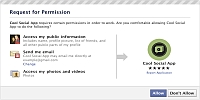
As previously mentioned, facebook released a new Graph API. It is based on OAuth 2.0 protocol (old authorization token also works). While it is fresh thing, there is no much ActionScript stuff around, so I came with FacebookOAuthGraph class. This class is meant to be used as an abstract class, while it contains just the basic authentication algorithm and call method to request data. It stores access token in SharedObject, so next time you came into app, you get connected on background without noticing (no popup etc.). Your token should expire in 24 hours.
Here is the code for the following flex app, to make it work, get latest FacebookOAuthGraph and FacebookOAuthGraphEvent classes.
<?xml version="1.0" encoding="utf-8"?>
<mx:Application xmlns:mx="http://www.adobe.com/2006/mxml" layout="vertical"
    applicationComplete="init()">
<mx:Script>
<![CDATA[

    import sk.yoz.events.FacebookOAuthGraphEvent;
    import sk.yoz.net.FacebookOAuthGraph;

    // facebook Application ID
    private var clientId:String = "268718683475";

    // path to our callback
    private var redirectURI:String =
        "http://blog.yoz.sk/examples/FacebookOAuthGraph/callback.html";

    // required extended permissions
    private var scope:String = "publish_stream,user_photos";

    private var facebook:FacebookOAuthGraph = new FacebookOAuthGraph();

    [Bindable] private var connected:Boolean;

    private function init():void
    {
        facebook.clientId = clientId;
        facebook.redirectURI = redirectURI;
        facebook.scope = scope;
        facebook.useSecuredPath = true;
        facebook.addEventListener(FacebookOAuthGraphEvent.AUTHORIZED, authorized);
        facebook.checkSavedToken();

        log.text += "checkSavedToken()\n";
    }

    private function connect():void
    {
        facebook.connect();

        log.text += "connect()\n";
    }

    private function authorized(event:FacebookOAuthGraphEvent):void
    {
        connected = true;

        log.text += "authorized\n";
    }

    private function call(path:String, binary:Boolean):void
    {
        var loader:URLLoader = facebook.call(path);
        loader.dataFormat = binary
            ? URLLoaderDataFormat.BINARY
            : URLLoaderDataFormat.TEXT;
        loader.addEventListener(FacebookOAuthGraphEvent.DATA, callComplete);
        log.text += "call(" + path + ")\n";
    }

    private function changeStatus(message:String):void
    {
        var data:URLVariables = new URLVariables();
        data.message = message;
        var method:String = URLRequestMethod.POST;
        var loader:URLLoader = facebook.call("me/feed", data, method);
        loader.addEventListener(FacebookOAuthGraphEvent.DATA, callComplete);
        log.text += "changeStatus(" + message + ")\n";
    }

    private function callComplete(event:FacebookOAuthGraphEvent):void
    {
        log.text += "call completed -> see result\n";

        if(event.rawData is ByteArray)
        {
            var loader:Loader = new Loader();
            loader.loadBytes(event.rawData as ByteArray);
            loader.contentLoaderInfo.addEventListener(Event.COMPLETE,
                function():void
                {
                    image.source = loader;
                });
        }
        else
        {
            result.text = event.rawData.toString();
        }
    }
]]>
</mx:Script>
<mx:HBox>
    <mx:Button click="connect()" label="connect" />
    <mx:Text text="{connected ? 'connected' : 'not connected'}" />
</mx:HBox>
<mx:HBox visible="{!connected}" includeInLayout="{!connected}">
    <mx:Text text="#access_token=121161974560905%7C2..." />
    <mx:TextInput id="hash" />
    <mx:Button label="add hash" click="facebook.confirmConnection(hash.text)"/>
</mx:HBox>
<mx:HBox>
    <mx:TextInput id="path" text="me" />
    <mx:Button label="call" click="call(path.text, false)" enabled="{connected}"/>
    <mx:Spacer width="20" />
    <mx:TextInput id="path2" text="me/picture" />
    <mx:Button label="call binary" click="call(path2.text, true)" enabled="{connected}"/>
</mx:HBox>
<mx:HBox>
    <mx:TextInput id="status" text="testing FacebookOAuthGraph" />
    <mx:Button label="change status" click="changeStatus(status.text)" enabled="{connected}"/>
</mx:HBox>
<mx:HDividedBox width="100%" height="100%">
    <mx:TextArea width="30%" height="100%" id="log"/>
    <mx:TextArea width="70%" height="100%" id="result"/>
    <mx:Image id="image" />
</mx:HDividedBox>
</mx:Application>
Make sure your html wrapper defines correct allowScriptAccess and both id and name for <object> tag. This enables ExternalInterface.objectID. With swfobject use:
var params = {
    allowScriptAccess: "sameDomain"
};

var attributes = {
    id: "FacebookOAuthGraphTest",
    name: "FacebookOAuthGraphTest"
};
swfobject.embedSWF("FacebookOAuthGraphTest.swf", "alternative", "100%", "100%", "10.0.0",
    "expressInstall.swf", flashvars, params, attributes);
callback.html pushes url hash into flash app. When running this application from desktop (creating/debugging), your callback.html located on public domain has no access to its opener (different domain – XSS), so you need to pass access_token manualy into <TextInput id=”hash”>, but once your flash application is on the same domain with callback, it works automaticaly.
callback.html:
<!DOCTYPE html PUBLIC "-//W3C//DTD XHTML 1.0 Strict//EN" "http://www.w3.org/TR/xhtml1/DTD/xhtml1-strict.dtd">
<html xmlns="http://www.w3.org/1999/xhtml" xml:lang="sk" lang="sk" dir="ltr">
<head>
	<script type="text/javascript">
	<!--
		if(window.opener && window.opener.confirmFacebookConnection)
		{
			window.opener.confirmFacebookConnection(window.location.hash);
			self.close();
		}
	//-->
	</script>
</head>
<body>
<p>You may now close this window.</p>
</body>
</html>
Click connect and allow facebook application. Facebook redirects to callback.html that pastes hash into flash and closes popup. Now you are authenticated. Next time you visit this flash application (refresh this page) you will get authenticated in background (if your access token is still valid). Notice, some graph api calls returns JSON objects (me), other may return binary data (me/picture). For now it may take some time to finish calls (5 second or more), but I hope facebook will soon make it fast.
You get your JSON decoded data via event.data. Just make sure you do not try to decode ByteArray (eg. me/picture)
// call("me")
private function callComplete(event:FacebookOAuthGraphEvent):void
{
    trace(event.data.name);
}
Some calls to test:
Friends:             me/friends
News feed:           me/home
Profile feed (Wall): me/feed
Likes:               me/likes
Movies:              me/movies
Books:               me/books
Notes:               me/notes
Photos:              me/photos
Videos:              me/videos
Events:              me/events
Groups:              me/groups
Additional information about my facebook app:
Application ID:    268718683475
Connect URL:       http://blog.yoz.sk/examples/FacebookOAuthGraph/
Base Domain:       yoz.sk
FBML/iframe:       iframe
Developer Mode:    Off
Application Type:  Desktop
Private Install:   No
Based on facebook access token, it should be valid approximately for 24 hours. Notice the bold part, works as expiration time (unix time format). Use FacebookOAuthGraph.tokenToExpiration() to parse Date:
access_token=268718683475%7C2.w3fjqz80Xi1CdBXt7Ygh6A__.86400.1273158000-1215645368%7CDGv2l2HtTymd6cM6Fy_8k6P_8CQ.
Important update: May 19, 2010: Application is working again. Due to massive support in bug tracker (thanks all for your votes), facebook devs changed secured crossdomain.xml, so it allows unsecured requests. changeStatus() method added into example and some minor changes in FacebookOAuthGraph class (please update).
Here is what happend and why this app was not working for a while:
May 11, 2010: facebook changed rules, so requests on unsecured graph service (via http://graph.facebook.com…) were limited to just those without access_token parameter. Requets to secured service (https://graph.facebook.com) resulted in security violation due to missing secure=”false” parameter in crossdomain.xml
May 12, 2010: bug submitted
May 12, 2010 – May 14, 2010: massive bug voting
May 14, 2010: Bug confirmed by facebook dev team
May 19, 2010: Bug fixed, crossdomain file changed
I am glad that facebook devs listens and care.
FAQ
How can I use this class in my iframe canvas page?
before generating flash, redirect from your html (via JavaScript or php) to authorization url https://graph.facebook.com/oauth/authorize?client_id=XXX&redirect_uri=BACKTOMYHTML&type=user_agent&scope=XXX
when it returns to your html it contains access_token (same as our callback.html)
now it is time to generate flash and pass this token into your flash via eg. flashvars.token
in ActionScript handle flashvar params and pass token into facebook.confirmConnection(“#access_token=” + token)
now you should get connected
When I connect with this app in one browser (firefox), and I run another browser (chrome) I get automatically connected. Why?
Your authorization token is stored in SharedObject, that is OS-user persistent (eg. windows user). No matter what browser you run, all of those reads data from one SharedObject. If you need cookie or session persistent authorization, please extend my class and override methods that use SharedObject.
How to add request parameters into my call?
Pass URLVariables object as a second parameter to call() method:
// eg. in order to make this call "me/picture?type=large", do the following:
var data:URLVariables = new URLVariables();
data.type = "large"
call("me/picture", data);
Jozef Chúťka — 2012-04-11: hi aarti, you should be able to access token on php, there is an php api documentation on https://developers.facebook.com/docs/reference/php/facebook-api/ , sending access token from php to flash can be done via flashvars … see “add hash” button functionality in my example
aarti gusain — 2012-04-17: hi jozef Once again i am here with my problem.actually jozef i had tried to solve the access token according to your suggestion but our team want to solve this problem in flash side completely,can you please suggest me how we get access token without open the popup. when we run our app on crome and if my popup setting is blocked ,in this case authantication popup does’nt open and my app is autherized completely and i get my all friends information,but when i run my app on mozzila and ie browser and we blocked our popup setting, in this case our app does not autherized and we do not get any friends information,so in this case my functionality do not work and its a big issue ,that’s why i want to try to get access token without opening any popup. if you have any solution please suggest me .
Jozef Chúťka — 2012-04-18: aarti, in order to get access token you must visit facebook page with authorization for your app. you can do it in popup or redirecting whole page (I would expect frames to not to work to avoid clickjacking). offline access seems to be depricated https://developers.facebook.com/roadmap/#may-2012 so user will have to reauthenticate with every new session – popup or redirect
Ttcat — 2012-05-10: Hi, Thanks for your project ! I got same problem about open a small popup window. It just open up a new tab or window. I looked into the Class, it looks ok ! Wonder if there’s other MUST HAVE js code in html ? public function connect():void { if(!tokenCallbackDefined) { tokenCallbackDefined = true; ExternalInterface.addCallback(jsConfirm, confirmConnection); } var id:String = ExternalInterface.objectID; var url:String = authorizationURL; var name:String = jsWindowName; var props:String = “width=670,height=370″; var js:String = ” + ‘if(!window.’ + jsConfirm + ‘){‘ + ‘ window.’ + jsConfirm + ‘ = function(hash){‘ + ‘ var flash = document.getElementById(“‘ + id + ‘”);’ + ‘ flash.’ + jsConfirm + ‘(hash);’ + ‘ }’ + ‘};’ + ‘window.open(“‘ + url + ‘”, “‘ + name + ‘”, “‘ + props + ‘”);’ ExternalInterface.call(“function(){” + js + “}”); }
Jozef Chúťka — 2012-05-11: Hi Ttcat, you do not need to have any additional code in javascript, you can define all needed via ExternalInterface, just make “Make sure your html wrapper defines correct allowScriptAccess and both id and name for tag.”
Vaishali Saxena — 2012-06-07: will you please resolve my query i have implemented your code it is connected with the application but not authrized…this function not call and add hash is also not called.. so please resolve my query..
Vaishali Saxena — 2012-06-07: My flash code is not connected with my Facebook application. I can not resolve the error and not getting the error that what and where is the problem.. on click the connect button the window show my application on logging into the account it appears the message “You may now close this window.” not connected with the application.. I can’t debug ma flash application.. please give me some solution how to resolve it..
Jozef Chúťka — 2012-06-07: Hi Vaishali, I have no idea what might went wrong based on your description. I suggest you debug flash callback method as well as javascript part.
Vaishali Saxena — 2012-06-12: I used your above code my application perfectly run and update the status, now i want to add the additional feature for uploading the photo using the above code… Can u send me the code to upload the photo on Facebook just like to update the status on the above code.. Thanx in advance….
Jozef Chúťka — 2012-06-12: hi Vaishali, have a look at http://blog.yoz.sk/2010/06/extending-facebookoauthgraph-class/