blog
2010 December Archive at Jozef Chúťka's blog
December 30, 2010
ApplicationUpdater ApplicationUpdaterUI namespace StatusUpdateEvent update.xml xml
Quick Tip: ApplicationUpdater for Updating AIR Executables
Few days ago I red an interesting article about Auto update for Adobe Air executable. This article is pretty self-explanatory, it is important to notice, you have to use ApplicationUpdater instead of ApplicationUpdaterUI that was designed for .air apps. One thing I was missing there was to make the process even more dynamic by reading the update url from an update.xml file. Long story short here is a piece of code doing exact the thing:
// var updater:ApplicationUpdater;
var xml:XML = updater.updateDescriptor;
var ns:Namespace = xml.namespace();
var request:URLRequest = new URLRequest(xml.ns::url);
navigateToURL(request);December 28, 2010
blackberry debug deploy install Playbook SDK
Quick Tip: Debugging BlackBerry on Flash Builder 4
After successful installing Playbook simulator and BlackBerry Air SDK, you may wonder how to deploy your app on simulator. Now you have 2 choices. You can use command line and run something like this:
blackberry-airpackager -package -installApp -launchApp -device 192.168.44.129 MyApp.bar src/MyApp-app.xml -C bin-debug MyApp.swf icons/90x90.png blackberry-tablet.xml… this command compiles .swf file into .bar file and installs on simulator. If you prefer click-and-deploy solution, just go into folder with your blackberry sdk:
.../sdks/blackberry-tablet-sdk-0.9.1/eclipse_for_FB401and copy all content into your flash builder / eclipse directory.
.../Adobe/Adobe Flash Builder 4December 22, 2010
C++ MouseEvent.exe MoveCursor.exe NativeProcess Remotair SystemMouse
SystemMouse Moves And Clicks In Your System
SystemMouse is a class I managed to create for Remotair demo receiver, in order to show how can remote MouseEvent-s be projected into system. Long story short, you can use moveBy() function to move the system cursor and event() function to make clicks. The class is based on NativeProcess. The NativeProcess class and its capabilities are only available to AIR applications installed with a native installer (extended desktop profile applications) means .exe/.dmg file.
December 16, 2010
AIR Androir inputs Remotair sensors transmit
Remotair

Remotair is a concept of transmitting device input events (gestures, accelerometer, camera etc.) into receiving flash or AIR application. Remotair consists of one transmitting application installed on a mobile device or a tablet and one receiving application running on a PC. In order to pair transmitting and receiving application, RTMFP protocol is used. The receiver API is public and released under MIT license.
You can download Remotair application from Android market (link only works on android devices) or see the Android application details on AppBrain. For a receiving application you may use the demo application located on remotair.yoz.sk or you can build your own one using Remotair Receiver API.
December 10, 2010
AccelerometerEvent GeolocationEvent GeomagneticField SensorManager
Geolocation + Accelerometer = Orientation
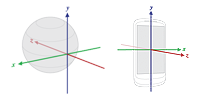
In order to get orientation of your android device you need to do “some” math, based on geolocation and accelerometer values. Working with Android native SDK, you are able to get orientation as easy as calling SensorManager.getOrientation(), but when it comes to AIR SDK, you have no access to the native SDK methods. However, thanks to open sources you are able to grab the original source and rewrite the thing into ActionScript. That is exatcly what I have done. The results are GeomagneticField and SensorManager classes. To make this happen you need both AccelerometerEvent and GeolocationEvent values as intput:
December 6, 2010
Quick Tip: SystemScreen Class
SystemScreen class is a group of constants helping you to convert between inches, centimeters and pixels based on Capabilities class. The results are not exact, but are pretty close. The following example demonstrates the real device screen size vs. SystemScreen calculated values based on Capabilities.screenDPI:
Real device:    SystemScreen:
       24.0"           30.59"
        3.4"            3.67"