blog
Tag Archive for AIR at Jozef Chúťka's blog
October 4, 2013
AIR Android Facebook iOS Login Popup SSO
Facebook SSO For Flash & Mobile AIR Apps

This implementation is taken from TrainLord as it runs on web (flash), android and iOS (AIR) platforms. Facebook’s authentication flows are based on the OAuth 2.0 protocol. Its recommended you have general undesrtanding of OAuth protocol prior reading this article.
If you run services on your own backend (like TrainLord does), the main point of whole thing is to securely pair a facebook id and user session. So later, whenever user does a request to your backend it automatically recoginzes the facebook id. In my case I used id and name to create an unique user record in my database so I can save some more user related data (score, etc.).
August 23, 2013
Uploading AIR app into Apple App Store

Few times per year I need to upload some AIR apps into apple app store. As I am not doing it regularly, I keep forgetting the necessary steps and it takes noticeable amount of time to figure out all the glitches that I keep hitting. I will try to keep this post actual at least regarding to my own app store experience.
July 18, 2011
Quick Tip: Installing AIR Runtime To Android Emulator

After I have installed Android SDK on a new machine, I have almost forgotten the steps necessary to run AIR application on Android emulator. There has been some changes within android sdk e.g. adb.exe is no longer located in “tools” dir but rather in “platform-tools”, to create a new emulator you can use SDKManager.exe… and to install AIR runtime on Android emulator, you can take .apk file located in AIR SDK (airsdk/runtimes/air/android/emulator/Runtime.apk) and install it via…
January 21, 2011
AIR Desktop NativeProcess Remotair remote
Remote Desktop With Remotair
A day ago I published a youtube video about remote Windows control from an Android device. I will try to clarify the process about how it is done. What you need to make this work for you is (1.) an Android device with Remotair application v 0.1.9 (or higher) installed, (2.) Windows with Remotair desktop .exe air application v 0.1.3 (or higher) and (3.) some capture-desktop softwer, VH Screen Capture works good.
December 16, 2010
AIR Androir inputs Remotair sensors transmit
Remotair

Remotair is a concept of transmitting device input events (gestures, accelerometer, camera etc.) into receiving flash or AIR application. Remotair consists of one transmitting application installed on a mobile device or a tablet and one receiving application running on a PC. In order to pair transmitting and receiving application, RTMFP protocol is used. The receiver API is public and released under MIT license.
You can download Remotair application from Android market (link only works on android devices) or see the Android application details on AppBrain. For a receiving application you may use the demo application located on remotair.yoz.sk or you can build your own one using Remotair Receiver API.
October 28, 2010
AIR loadPolicyFile Security URLRequest
Quick Tip: AIR 2.5 & Security.loadPolicyFile()
After switching my AIR application into new AIR 2.5 SDK, boom! Every single URLRequest threw an IOErrorEvent. No other exception thrown. So I started digging in in order to find the cause and it appeared to be Security.loadPolicyFile() execution (I am reusing some libs containing these lines) that blocked it all quietly. First I tried to do try-catch block over it, but with no success. Than I just removed the lines for AIR project and voilà, everything back to normal again. URLRequests works again. It seems like AIR does not need loadPolicyFile() for URLRequests at all. Interesting that these loadPolicyFile() were targeting total different domain and were able to break any other requests.
October 19, 2010
adb AIR apk certificate debug emulator install
Debug & Deploy Flash on Android
It is now a few weeks after I started experimenting with AIR for Android. While watching all the great tutorials about how to make things work (AIR for Android – Part 1, Part 2) and how to debug application running on device (Debug AIR apps on Android with Flash Builder 4, another in french and Flash), I have decided to attach some of my own findings and practices to build, deploy and debug apps.
To start, it is a good practice to setup your environment variable path to Android sdk and AIR sdk:
PATH: ...;C:/Users/Yoz/Work/Android/SDK/2.2;C:\Program Files\Adobe\Adobe Flash Builder 4\sdks\4.1.0.16076-AIR2.5\binNext, the whole certificate thing does not make sense to me because you can/have to create one by yourself. The cert need to be valid for 25 years else Android Market will not accept your application (bye bye real signed certificate from PGP TrustCenter 🙁 )
October 13, 2010
AIR Android Facebook FacebookOAuthGraph StageWebView
Authorizing Facebook Applications in Android

Hold on, this is going to be fast and smooth! I am playing with an Android Emluator for a few days now. One of the challenges was to mount FacebookOAuthGraph lib into Android. It turned out to be 1 hour task. Thanks to Flash-Core article and sHTiF and StageWebView. Long live AIR for Android! 🙂 Follow the article for codes:
October 11, 2010
Quick Tip: AIR Application Without Flex Framework
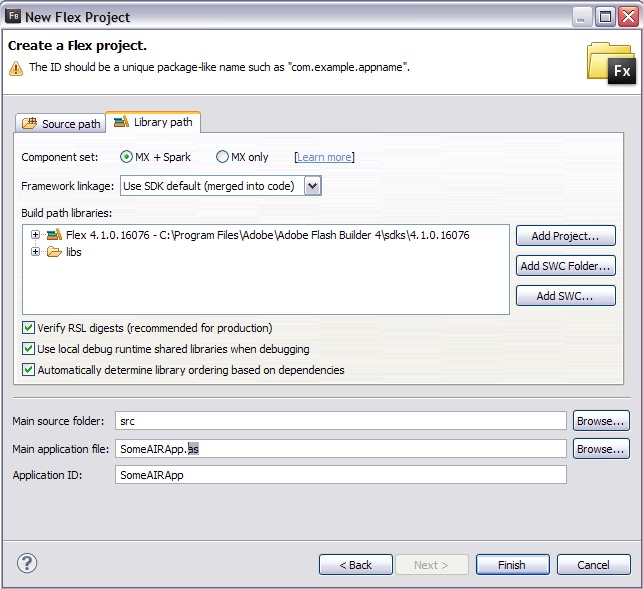
This may be pretty known thing, but I would like to share it. When creating a new AIR project in flash builder (File / New / Flex Project / … Desktop – AIR), and you do not require flex framework, just rename the “Main application file” to whatever.as (instead of whatever.mxml) in the last step of creation wizard (screenshot attached). Or, if your project already exists with main app.mxml file, just create new file with the same name app.as and remove the old one (app.mxml). Make sure your main application class extends Sprite.
September 24, 2010
AIR AppUp certificate Marketplace Melrose
Adobe Melrose – The Place To Sell Your Apps
This post is about Adobe Melrose – the new Lab project from Adobe, and my first contact with it. I hope to be able to continuously update this article so you can get perfect view of what is going on when you decide to use Melrose. Lets begin with public static const MELROSE: 🙂
Melrose (codename) enables developers and publishers to distribute and make money with Adobe® AIR® applications through application stores. Melrose provides a repository that distributes applications to multiple application stores so that publishers can reach millions of users. Intel AppUp Center and the Adobe AIR Marketplace are the first two storefronts available in Melrose. Melrose also provides analytics that let publishers measure success of their applications.