blog
AIR Archive at Jozef Chúťka's blog
October 4, 2013
AIR Android Facebook iOS Login Popup SSO
Facebook SSO For Flash & Mobile AIR Apps

This implementation is taken from TrainLord as it runs on web (flash), android and iOS (AIR) platforms. Facebook’s authentication flows are based on the OAuth 2.0 protocol. Its recommended you have general undesrtanding of OAuth protocol prior reading this article.
If you run services on your own backend (like TrainLord does), the main point of whole thing is to securely pair a facebook id and user session. So later, whenever user does a request to your backend it automatically recoginzes the facebook id. In my case I used id and name to create an unique user record in my database so I can save some more user related data (score, etc.).
August 23, 2013
Uploading AIR app into Apple App Store

Few times per year I need to upload some AIR apps into apple app store. As I am not doing it regularly, I keep forgetting the necessary steps and it takes noticeable amount of time to figure out all the glitches that I keep hitting. I will try to keep this post actual at least regarding to my own app store experience.
February 8, 2013
Quick Tip: Key Hash For Facebook Android Application in AIR

It may be a little tricky to setup “Native Android App” section for your Facebook application. Especially the field “Key Hashes”. Facebook provides instructions for acquiring debug version hash but is not very clear about how to get one for signed application. There is a lot of valid answers around the internet, but the one I needed was still missing. Imagine this simple scenario where you export and sign (using .p12 cert) your AIR Android project, you have an .apk file and want to get a key hash for facebook. Then I finally found the answer:
July 18, 2011
Quick Tip: Installing AIR Runtime To Android Emulator

After I have installed Android SDK on a new machine, I have almost forgotten the steps necessary to run AIR application on Android emulator. There has been some changes within android sdk e.g. adb.exe is no longer located in “tools” dir but rather in “platform-tools”, to create a new emulator you can use SDKManager.exe… and to install AIR runtime on Android emulator, you can take .apk file located in AIR SDK (airsdk/runtimes/air/android/emulator/Runtime.apk) and install it via…
January 21, 2011
AIR Desktop NativeProcess Remotair remote
Remote Desktop With Remotair
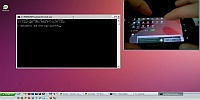
A day ago I published a youtube video about remote Windows control from an Android device. I will try to clarify the process about how it is done. What you need to make this work for you is (1.) an Android device with Remotair application v 0.1.9 (or higher) installed, (2.) Windows with Remotair desktop .exe air application v 0.1.3 (or higher) and (3.) some capture-desktop softwer, VH Screen Capture works good.
January 7, 2011
ByteArray compress gzip gzuncompress lzma zip
Quick Tip: Compression in Flash
While working on one of my projects where I needed compression for transfered data, I hit some very interesting compression libraries. Also the ByteArray class contains compress method, using zlib algorithm in flash player or multiple algorithms in AIR. At the end I decided to use ByteArray.compress() method for encoding vs. PHP gzuncompress for decoding, what works correctly, fast and smooth.
Here is a list of 3rd party compression libraries and other good stuff:
AS3 Zip: ActionScript 3 based library for reading and writing zip files
FZip: FZip is an Actionscript 3 class library to load, modify and create standard ZIP archives.
ASZip: ActionScript 3 library to generate ZIP files
LZMA Encoder: AS3 class to compress data using LZMA algorithm.
LZMA Decoder: A part of the apparat framework.
GZIP: ActionScript GZIP compression library
Gzip for HTTPService/URLLoader: Adding Gzip support for Flex/AIR HTTPService/URLLoader
airxzip: Zip library for ActionScript3 on AIR
If you know some more, please let me know.
December 30, 2010
ApplicationUpdater ApplicationUpdaterUI namespace StatusUpdateEvent update.xml xml
Quick Tip: ApplicationUpdater for Updating AIR Executables
Few days ago I red an interesting article about Auto update for Adobe Air executable. This article is pretty self-explanatory, it is important to notice, you have to use ApplicationUpdater instead of ApplicationUpdaterUI that was designed for .air apps. One thing I was missing there was to make the process even more dynamic by reading the update url from an update.xml file. Long story short here is a piece of code doing exact the thing:
// var updater:ApplicationUpdater;
var xml:XML = updater.updateDescriptor;
var ns:Namespace = xml.namespace();
var request:URLRequest = new URLRequest(xml.ns::url);
navigateToURL(request);December 28, 2010
blackberry debug deploy install Playbook SDK
Quick Tip: Debugging BlackBerry on Flash Builder 4
After successful installing Playbook simulator and BlackBerry Air SDK, you may wonder how to deploy your app on simulator. Now you have 2 choices. You can use command line and run something like this:
blackberry-airpackager -package -installApp -launchApp -device 192.168.44.129 MyApp.bar src/MyApp-app.xml -C bin-debug MyApp.swf icons/90x90.png blackberry-tablet.xml… this command compiles .swf file into .bar file and installs on simulator. If you prefer click-and-deploy solution, just go into folder with your blackberry sdk:
.../sdks/blackberry-tablet-sdk-0.9.1/eclipse_for_FB401and copy all content into your flash builder / eclipse directory.
.../Adobe/Adobe Flash Builder 4December 22, 2010
C++ MouseEvent.exe MoveCursor.exe NativeProcess Remotair SystemMouse
SystemMouse Moves And Clicks In Your System
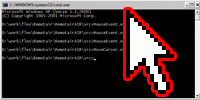
SystemMouse is a class I managed to create for Remotair demo receiver, in order to show how can remote MouseEvent-s be projected into system. Long story short, you can use moveBy() function to move the system cursor and event() function to make clicks. The class is based on NativeProcess. The NativeProcess class and its capabilities are only available to AIR applications installed with a native installer (extended desktop profile applications) means .exe/.dmg file.
December 16, 2010
AIR Androir inputs Remotair sensors transmit
Remotair

Remotair is a concept of transmitting device input events (gestures, accelerometer, camera etc.) into receiving flash or AIR application. Remotair consists of one transmitting application installed on a mobile device or a tablet and one receiving application running on a PC. In order to pair transmitting and receiving application, RTMFP protocol is used. The receiver API is public and released under MIT license.
You can download Remotair application from Android market (link only works on android devices) or see the Android application details on AppBrain. For a receiving application you may use the demo application located on remotair.yoz.sk or you can build your own one using Remotair Receiver API.