blog
Flash / Flex ArchiveJozef Chúťka's blog — blog.yoz.sk/category/flash-flex/page/4/
August 9, 2010
ContextMenu exe projector showDefaultContextMenu Stage standalone
Quick Tip: Standalone Player Default Menu Disappeared
Did you know that setting stage.showDefaultContextMenu = false, makes disappear not only right-click context-menu (ContextMenu), but also standalone player default window menu (File, View, Options, Help)? I came on this one when tried to create projectors (.exe) files from .swf-s files running in standalone player using “File / Create projector…” feature. All tested/opened .swf files were showing player window menu ok, just one .swf made player window menu disappear, after a while I discovered the showDefaultContextMenu was the cause.
stage.showDefaultContextMenu = falseAugust 4, 2010
AND left NOT OR right shift XOR
ActionScript Bitwise Calculator
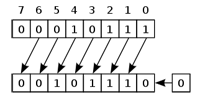
In computer programming, a bitwise operation operates on one or more bit patterns or binary numerals at the level of their individual bits. Bitwise operations are extremely fast and compact. Anytime we can speak to a computer in its native binary tongue, we save room and gain speed (moock.org). Now, lets see how it works. I have created a small flex application, try playing with numbers (input decimals) to understand what is actually happening with bits using different operators (10 and 3 are good inputs).
August 2, 2010
Quick Tip: Multi-Dimensional Vectors
Have you ever thought of creating or using multi-dimensional Vector in ActionScript? Yes, it is possible and the definition syntax comes pretty logical to me now ;-) .
var list:Vector.<Vector.<int>> = new Vector.<Vector.<int>>();…or shorter declaration:
var list:Vector.<Vector.<int>> = new <Vector.<int>>[];now your vectors have two dimensions, I mean:
list[0][0]August 2, 2010
ByteArray Endian pixel bender Shader ShaderJob Vector
Pixel Bender Inputs – Vector or ByteArray

Pixel Bender for Flash Player lets you play some more advanced games. Based on your needs you can force your kernels to “eat” not only BitmapData, but also ByteArray-s or Vector-s. With this knowledge, you can simply use Pixel Bender kernels for some fast math or processing like 3D engines (3D to 2D projection) etc. Lets have a look at some simple demos, how to push vector and raw bytes directly into shader via ShaderJob:
July 29, 2010
connection NetConnection NetGroup NetStream port RTMFP
RTMFP Connection Tester
Having problems connecting RTMFP? Use this application to test NetConnection, NetStream, NetGroup connection and publishing status. For success connection, opened UDP ports in range 1024..65535 required. Run two instances to test NetGroup neighboring.
July 28, 2010
NetConnection NetGroup NetStream post send UNIPacket UNIPacketHeader
UNIPacket – Standardize NetGroup, NetStream Raw Messages

UNIPacket and UNIPacketHeader classes is my attempt to standardize communication within NetStream and NetGroup communication. While both Net* classes enables you to send any raw data between two instances of flash, you should carefully handle incomming messages. Imagine you are willing to send additional info with your message (sender, id etc.). That is where UNIPacket classes comes into scene, both are very simple and able to selfcreate from incomming object.
UNIPacket contains only two variables: header:UNIPacketHeader and data:* (holds the actual data being sent).
UNIPacketHeader is dynamic class with prepared variables: id:uint (numeric identificator of message), hash:String (string identificator of message), sender:String (use for sender identification).
July 27, 2010
click getSize MouseEvent select SelectableButton SimpleButton toggle
Quick Tip: SimpleButton to SelectableButton
sk.yoz.ui.SelectableButton class may be handy for you if you decided to drop framework and make your own lightweight components. It extends SimpleButton (basic ActionScript 3 component) and ads selected state and toggle functionality by switching states on click event. You may want to extend it for selectedUpState, selectedOverState, selectedDownState, feel free to do that.
usage:
import sk.yoz.ui.SelectableButton;

// any graphics here
var upState:DisplayObject;
var overState:DisplayObject;
var downState:DisplayObject
var hitTestState:DisplayObject;

// changes selected state on mouse click
var toggle:Boolean = true;

var button:SelectableButton;
button = SelectableButton(upState, overState, downState, hitTestState, toggle);

// toggle select button without user interaction
button.selected = true;July 26, 2010
broadcast channel conferences live Microphone onStream P2P webcamera
onStream – The Broadcasting Machine

onStream – The Broadcasting Machine is the name of my latest flash project. Slogan says: “Broadcast LIVE video to your friends or the whole world from a computer or mobile. Watch other people broadcasting their webcamera, conferences, shows or movies.” With this flash application you can broadcast your webcamera, tv card, desktop or movies (read the section “What can be broadcasted?”). With different broadcasting settings you can broadcast to unlimited number of viewers as well as make private videochats. Based on your connection speed, choose appropriate quality for your broadcasts from 320×160 px webcamera resolution with 11kHz sound sampling up to high definition broadcasts.
The application is located on http://onstream.yoz.sk and there also exist a facebook application http://apps.facebook.com/onstream/. You can also publish and run the application from facebook newsfeed stream.
July 19, 2010
attachAudio attachCamera Camera Microphone NetConnection NetGroup NetStatusEvent NetStream
Quick Tip: Working with NetStream
While working on my brand new P2P project I have come to some issues and solutions, that may help you with your projects. First thing, the NetStatusEvent codes. You may expect that codes are dispatched by the instance of the class they beigins with (e.g. “NetStream.Connect.Success” dispatched by NetStream), but in fact, this does not happen (“NetStream.Connect.Success” is dispatched by NetConnection). I bellieve its not a bug but a feature by flash player developer team. To make this work as expected you may do the following:
netConnection.addEventListener(type, onNetStatus);

function onNetConnectionNetStatus(event:NetStatusEvent):void
{
	switch(event.info.code){
		case "NetStream.Connect.Success":
			event.info.stream.dispatchEvent(event);
			break;
		...
	}
}July 12, 2010
Unable to Embed Font When Targeting Flash Player 10.1
I am just so stuck on this one. Is anyone able to embed font and use it in TextField when targeting Flash player 10.1 using flex 4.1 SDK? My code is very simple:
package
{
    import flash.display.Sprite;
    import flash.text.TextField;
    import flash.text.TextFormat;

    public class Test1 extends Sprite
    {
        [Embed(source="arial.ttf", fontName="Arial", mimeType='application/x-font')]
        public static const FONT_ARIAL:Class;

        public function Test1()
        {
            var tf:TextField = new TextField();
            tf.text = "Hallo";
            tf.embedFonts = true;
            tf.defaultTextFormat = new TextFormat("Arial", 10);
            addChild(tf);
        }
    }
}
font file (.ttf) can be downloaded here. When I try to export the movie I see nothing but white. Actualy it seems like no matter what sdk nor flash player version I target, it still does not render text :-( what is going on flashplayer?
Mistery solved!, you have to set defaultTextFormat before text. Credits goes to Martin.
Where to go from here: