blog
Tag Archive for embed at Jozef Chúťka's blog
November 23, 2010
Quick Tip: Flash CS Button to Flex
If are trying to embed button symbols (extended SimpleButton) from Flash CS and the results are not what expected:
[Embed(source="assets/elements.swf", symbol="my_button")]
public static const BUTTON_CLASS:Class;
...
addChild(new BUTTON_CLASS())
try exporting your elements into .swc and attach into Flex project, later in code do:
public static const BUTTON_CLASS:Class = my_button;
...
addChild(new BUTTON_CLASS())
This may also help you capturing Event-s dispatched on custom frame from loaded MovieClips.
July 12, 2010
Unable to Embed Font When Targeting Flash Player 10.1
I am just so stuck on this one. Is anyone able to embed font and use it in TextField when targeting Flash player 10.1 using flex 4.1 SDK? My code is very simple:
package
{
    import flash.display.Sprite;
    import flash.text.TextField;
    import flash.text.TextFormat;

    public class Test1 extends Sprite
    {
        [Embed(source="arial.ttf", fontName="Arial", mimeType='application/x-font')]
        public static const FONT_ARIAL:Class;

        public function Test1()
        {
            var tf:TextField = new TextField();
            tf.text = "Hallo";
            tf.embedFonts = true;
            tf.defaultTextFormat = new TextFormat("Arial", 10);
            addChild(tf);
        }
    }
}
font file (.ttf) can be downloaded here. When I try to export the movie I see nothing but white. Actualy it seems like no matter what sdk nor flash player version I target, it still does not render text 🙁 what is going on flashplayer?
Mistery solved!, you have to set defaultTextFormat before text. Credits goes to Martin.
Where to go from here:
Loading Fonts at Runtime with latest Flex 4 SDK
June 7, 2010
Quick tip: Characters To Include For Czech & Slovak
In a lot of projects we need to embed czech and slovak characters. Here is a list of those I mostly embed:
ÁáÄäČčĎďÉéĚěÍíĺĹľĽŇňÔôÓóŘřŠšŤťÚúŮůÝýŽž !”#$%&’()*+,-./0123456789:;?@ABCDEFGHIJKLMNOPQRSTUVWXYZ[\]^_`abcdefghijklmnopqrstuvwxyz{|}<=>'May 6, 2010
embed Flash Flex MovieClip Sprite TypeError
Quick tip: Embedded MovieClip not MovieClip?
When embedding MovieClips (with only one frame) from Flash .swf file into your Flex projects, you can fall into runtime issues:
[Embed(source="assets/preloader.swf", symbol="preloader")]
public static const PRELOADER_CLASS:Class;
MovieClip(new Assets.PRELOADER_CLASS());
TypeError: Error #1034: Type Coercion failed: cannot convert *** to flash.display.MovieClip.January 12, 2010
antialias Arial Bitmap text css embed fontAntialiasType fontFamily fontSize TextField
Embed Bitmap text into Flex
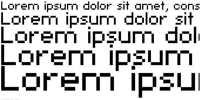
This article helps you embed pixel sharp fonts (without antialias) into your flex apps. As far as I know you wouldn’t be able to do this just by direct embedding local font file into your flex application, but you gonna need Flash CS4 authoring tool. There are two ways you can make Bitmap text work in flex. You can use pure css method or actionscript method. The downside of both methods is, you have to define and export from flash exact font size you are going to use.
November 19, 2009
Arial embed font font-face fontFamily fontWeight
Embedding fonts bold vs. black
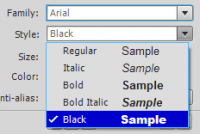
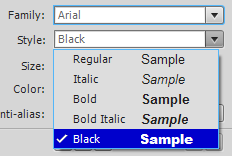
Embedding fonts into flex app can be a tricky things. Lets suggest you need to embed Arial font in both bold and black style. When you open some desktop application using local font list, you notice Arial font family and under this option there is a list of styles. There is a bold and black style in one list so one would guess it is the same thing setting. Well, it is not. When it comes to embedding into flex, the code varies much more…
October 27, 2009
ActionScript asset Class css embed image mxml
Quick tip: embedding in Flex
In Flex application, you can embed your assets into 3 places: ActionScript, MXML, CSS. To embed into ActionScript use following syntax:
[Embed(source="assets/image.png")]
public var imageClass:Class;

[Embed(source="assets/library.swf", symbol="symbol1")]
public var symbol1Class:Class;

// flash library symbol alternative
[Embed(source="assets/library.swf#symbol2")]
public var symbol2Class:Class;
To embed into MXML use:
<mx:Image source="@Embed('assets/image.png')"/>
<mx:Image source="@Embed('assets/library.swf', symbol='symbol1')"/>
<mx:Image source="@Embed('assets/library.swf#symbol2')"/>
<mx:Button skin="{null}"/>
To embed asset into CSS file use syntax:
Button
{
    upSkin: Embed(source="assets/image.png");
    overSkin: Embed(source="assets/library.swf", symbol="symbol1");
    downSkin: Embed(source="assets/library.swf#symbol2");
    selectedUpSkin:ClassReference(null);
}

@font-face
{
    font-family: Copacetix;
    src: url("assets/copacetix.ttf");
    unicode-range:
        U+0020-U+0040, /* Punctuation, Numbers */
        U+0041-U+005A, /* Upper-Case A-Z */
        U+005B-U+0060, /* Punctuation and Symbols */
        U+0061-U+007A, /* Lower-Case a-z */
        U+007B-U+007E; /* Punctuation and Symbols */
}
Embedding font to .as (.mxml):
[Embed(source="../arial.ttf", fontFamily="myArial")]
public static const FONT_ARIAL:Class;
public static const FONT_ARIAL_NAME:String = "myArial";

[Embed(source="../fonts.swf", fontName="myCourier", fontWeight="bold|normal") ]
public static const FONT_COURIER:Class;
Font.registerFont(FONT_COURIER);

public function Test()
{
    var format:TextFormat = new TextFormat();
    format.font	= FONT_ARIAL_NAME;

    var tf:TextField = new TextField();
    tf.embedFonts = true;
    tf.defaultTextFormat = format;
}
Read more about embedding assets into ActionScript best practices here. Read basics about embedding here.
October 23, 2009
code embed EmbedCode generate html object
EmbedCode class to generate html code
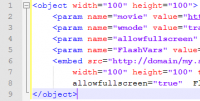
EmbedCode class generates html code for your .swf files. You can define url, size, parameters, flashVars and the result is valid standard (<object>, <params>, <embed>) html code, that you can just copy paste into your htmls, blogs, gigya widgets etc.
Application
October 20, 2009
embed mp3 music share SoundCloud
SoundCloud – We Move Music
SoundCloud lets you move music fast & easy. The platform takes the daily hassle out of receiving, sending & distributing music for artists, record labels & other music professionals. (SoundCloud)
IMHO very perspective and powerful tool for sharing and embedding music, but the webpage should react faster in some cases. I hope it is just a temporary issue…
October 14, 2009
asset Bitmap Class embed Flash Flex library SpriteAsset symbol
Embedding assets wisely
You can embed various types of assets in your Adobe Flex applications (.jpeg, .png, .swf, .mp3, .svg, .ttf …). Embedded assets are compiled into the SWF file of your Flex application. They are not loaded at run time and you do not have to deploy the original asset files with your application. Read more about embedding assets on Adobe.
Basics first. How to make your symbol from Flash library visible for Flex (see images on the bottom of the artice):
1. Create your symbol and linkage (library (Ctrl+L) / {your symbol} / Linkage…).
2. Linkage Properties, set your class name that will be used in [Embed] meta.
3. Export .swf file and make Assets.as.