blog
Tag Archive for css at Jozef Chúťka's blog
October 13, 2011
css highlight ISequence parser SequenceParser
SequenceParser – Simple yet Mighty
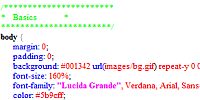
With my latest approach to create universal parser, I came up with something simple yet mighty. SequenceParser is a simple (30 lines) class that crawles any source and matches specified list of highly customizable ISequences. While each sequence can contain list of nester sequences, you are able to parse any type of source with nested conditions and sequences. A good example can be an attribute inside a xml node, a xml node inside a xml node, an escape character inside quotas etc.
I have also created some example sequences like MatchAnything, MatchRegexp, MatchString, StartRegexpEndRegexp, StartRegexpEndString, StartStringEndString that should help to cover almost any possible parsing scenario. These sequences notifies back via callback containing parsed string, that is vital for further bulding additional logic like highlightning, validation over parsed phrases.
March 10, 2010
css font-face fontFamily fontStyle fontWeight Helvetica
What fontName to use with embedding?
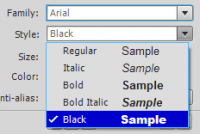
This article extends “Embedding fonts bold vs. black” post. Sometimes it may be tricky to guess correct fontName with your font. Compilator works with different fontNames than what Flash IDE shows you. Lets say you want to embed fonts from .swf (library) file into .css file. In Flash IDE, properties panel for TextInput, character Family and Style stand for something totaly different that what you gonna need with correct fontName value later in .css file. In fact solution is very easy.
January 12, 2010
antialias Arial Bitmap text css embed fontAntialiasType fontFamily fontSize TextField
Embed Bitmap text into Flex
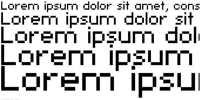
This article helps you embed pixel sharp fonts (without antialias) into your flex apps. As far as I know you wouldn’t be able to do this just by direct embedding local font file into your flex application, but you gonna need Flash CS4 authoring tool. There are two ways you can make Bitmap text work in flex. You can use pure css method or actionscript method. The downside of both methods is, you have to define and export from flash exact font size you are going to use.
October 27, 2009
ActionScript asset Class css embed image mxml
Quick tip: embedding in Flex
In Flex application, you can embed your assets into 3 places: ActionScript, MXML, CSS. To embed into ActionScript use following syntax:
[Embed(source="assets/image.png")]
public var imageClass:Class;

[Embed(source="assets/library.swf", symbol="symbol1")]
public var symbol1Class:Class;

// flash library symbol alternative
[Embed(source="assets/library.swf#symbol2")]
public var symbol2Class:Class;
To embed into MXML use:
<mx:Image source="@Embed('assets/image.png')"/>
<mx:Image source="@Embed('assets/library.swf', symbol='symbol1')"/>
<mx:Image source="@Embed('assets/library.swf#symbol2')"/>
<mx:Button skin="{null}"/>
To embed asset into CSS file use syntax:
Button
{
    upSkin: Embed(source="assets/image.png");
    overSkin: Embed(source="assets/library.swf", symbol="symbol1");
    downSkin: Embed(source="assets/library.swf#symbol2");
    selectedUpSkin:ClassReference(null);
}

@font-face
{
    font-family: Copacetix;
    src: url("assets/copacetix.ttf");
    unicode-range:
        U+0020-U+0040, /* Punctuation, Numbers */
        U+0041-U+005A, /* Upper-Case A-Z */
        U+005B-U+0060, /* Punctuation and Symbols */
        U+0061-U+007A, /* Lower-Case a-z */
        U+007B-U+007E; /* Punctuation and Symbols */
}
Embedding font to .as (.mxml):
[Embed(source="../arial.ttf", fontFamily="myArial")]
public static const FONT_ARIAL:Class;
public static const FONT_ARIAL_NAME:String = "myArial";

[Embed(source="../fonts.swf", fontName="myCourier", fontWeight="bold|normal") ]
public static const FONT_COURIER:Class;
Font.registerFont(FONT_COURIER);

public function Test()
{
    var format:TextFormat = new TextFormat();
    format.font	= FONT_ARIAL_NAME;

    var tf:TextField = new TextField();
    tf.embedFonts = true;
    tf.defaultTextFormat = format;
}
Read more about embedding assets into ActionScript best practices here. Read basics about embedding here.