blog
Tag Archive for Flex at Jozef Chúťka's blog
May 6, 2010
embed Flash Flex MovieClip Sprite TypeError
Quick tip: Embedded MovieClip not MovieClip?
When embedding MovieClips (with only one frame) from Flash .swf file into your Flex projects, you can fall into runtime issues:
[Embed(source="assets/preloader.swf", symbol="preloader")]
public static const PRELOADER_CLASS:Class;
MovieClip(new Assets.PRELOADER_CLASS());
TypeError: Error #1034: Type Coercion failed: cannot convert *** to flash.display.MovieClip.December 4, 2009
Charts Flex interpolateValues LineChart LineSeries Stroke
Flex Charts – interpolating values in Series
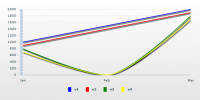
Recently, I felt into problem with chart when using interpolateValues parameter set to true. You expect it to work as described in Language Reference. And guess what, it works 🙂 , but make sure you provide correct numeric values (not strings – those were problematic in my case). Parameter interpolateValues is able to draw a continuous line by interpolating the missing value. Missing values means null (v1 in example) or when key is omited (v2).
If you want to use Charts in Flex, download data visualization components for your flex builder and copy content into sdk directory.
November 15, 2009
9 slice scale Bitmap Flash Flex solution
9 slice scale for bitmaps in flash (no hacks)
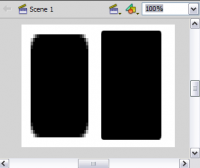
9 slice scale is a nice feature, but when you try to use 9 slice in flash ide on MovieClip with bitmap, you will notice a problem. It will just not work as expected. So first thing you try is “Break Apart”, with same result. You are almost there, but due to the solution is not documented you need a small hint: After break apart (ctrl + b), select each of nine slices one by one and group (ctrl + g) individually and voilà its done. See snapshot and result images…
October 29, 2009
bug debug player firewall Flex mm.cfg port PreloadSwf profiler web browser
Flex 3 profiling not working (update)
The profiler is a part of the Flex Builder IDE, that listens for messages from the profiler agent. The profiler agent is a swf launched in parallel to your main swf. It is located in your Flex workspace at .metadata/.plugins/com.adobe.flash.profiler/ProfilerAgent.swf. Your IDE gets this agent to start by editing your mm.cfg and adding a “PreloadSwf” line. The agent uses the flash.sampler.* API to gather data on your main swf, and sends it to the IDE using TCP on a preconvened port. This port is 9999 by default, you can change it in Preferences/Flex/Profiler/Connections.
If you can not get your profiler working, there are few methods you should try:
close all other tabs
install debug player
change browser
change port
disable firewall / antivirus
define PreloadSwf path
localhost / 127.0.0.1
allocate console
ultimate methods (what worked for me)
October 19, 2009
ActionScript browser Canvas Flex FlexIFrame html IFrame JavaScript web
Flex IFrame – Web browser in flash (update)

You can not have a web browser inside your web flash applications right? Well, you can! This solution uses html iframe to generate fake build in browser. So the behaviour of the browser in flash is the same as the one you are previewing this flash in (it is the same one). The best part of it is, you can manipulate with the position and size of this browser directly from flash. sk.yoz.html.IFrame solution was inspired by Alistair Rutherford, www.netthreads.co.uk.
FlexIFrame.js
Application
Application html
October 14, 2009
asset Bitmap Class embed Flash Flex library SpriteAsset symbol
Embedding assets wisely
You can embed various types of assets in your Adobe Flex applications (.jpeg, .png, .swf, .mp3, .svg, .ttf …). Embedded assets are compiled into the SWF file of your Flex application. They are not loaded at run time and you do not have to deploy the original asset files with your application. Read more about embedding assets on Adobe.
Basics first. How to make your symbol from Flash library visible for Flex (see images on the bottom of the artice):
1. Create your symbol and linkage (library (Ctrl+L) / {your symbol} / Linkage…).
2. Linkage Properties, set your class name that will be used in [Embed] meta.
3. Export .swf file and make Assets.as.
October 8, 2009
ActionScript Flex instance lock private singleton
Update: ActionScript 3 singleton pattern
In software engineering, the singleton pattern is a design pattern that is used to restrict instantiation of a class to one object. This is useful when exactly one object is needed to coordinate actions across the system. The concept is sometimes generalized to systems that operate more efficiently when only one object exists, or that restrict the instantiation to a certain number of objects (say, five). Some consider it an anti-pattern, judging that it is overused, introduces unnecessary limitations in situations where a sole instance of a class is not actually required, and introduces global state into an application. (wikipedia)
In search of the best actionscript 3 singleton pattern I came to this one. It uses private lock so user is not allowed to create new instance…