blog
Fixing Z-sorting in Papervision 3D (update) at Jozef Chúťka's blog
March 4, 2010
BasicRenderEngine Cube DisplayObject3D Papervision 3D QuadrantRenderEngine sortMode ViewportLayer ViewportLayerSortMode z-sort
Fixing Z-sorting in Papervision 3D (update)
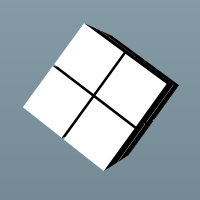
It may be very tricky thing to get papervision 3d scene rendered correctly event for the simpliest objects. In my case, I have created simple 3d scene with few primitive objects (8 cubes). Cubes are positioned close to each other to create shape of bigger cube + some small space between. Cubes are added into wrapping DisplayObject3D, later wrapper is added to scene in order to make it easy to rotate cubes as a group. Camera targets the center of the scene. In the demo, there are 3 sliders to rotate wrapping object in each x, y, z axis + two buttons that rotates wrapper in the problematic possition (based on z-sorting fix approach). Finally I managet it to work, you can follow my approaches below. Notice the changes are not cummulative, each approach comes from original Application.mxml. All of the ideas collected online from blogs, forums etc.
Application.mxml code
<?xml version="1.0" encoding="utf-8"?>
<mx:Application xmlns:mx="http://www.adobe.com/2006/mxml" layout="absolute"
    applicationComplete="init()" enterFrame="loop()"
    frameRate="40">
<mx:Script>
<![CDATA[
    import org.papervision3d.objects.DisplayObject3D;
    import org.papervision3d.objects.primitives.Cube;
    import org.papervision3d.materials.ColorMaterial;
    import org.papervision3d.materials.utils.MaterialsList;
    import org.papervision3d.render.BasicRenderEngine;
    import org.papervision3d.cameras.Camera3D;
    import org.papervision3d.scenes.Scene3D;
    import org.papervision3d.view.Viewport3D;

    private var viewport:Viewport3D;
    private var scene:Scene3D = new Scene3D();
    private var camera:Camera3D = new Camera3D(60, 10, 1000);
    private var renderer:BasicRenderEngine= new BasicRenderEngine();
    private var wrapper:DisplayObject3D = new DisplayObject3D();

    private var black:ColorMaterial = new ColorMaterial(0x000000, 1);
    private var white:ColorMaterial = new ColorMaterial(0xffffff, 1);

    private function init():void
    {
        viewport = new Viewport3D(width, height, false);
        container.addChild(viewport);

        black.opposite = true;
        white.opposite = true;

        var materialList:MaterialsList = new MaterialsList();
        materialList.addMaterial(black, "top");
        materialList.addMaterial(black, "bottom");
        materialList.addMaterial(white, "left");
        materialList.addMaterial(white, "right");
        materialList.addMaterial(black, "front");
        materialList.addMaterial(black, "back");

        var cube:Cube;
        for(var x:uint = 0; x < 2; x++)
        for(var y:uint = 0; y < 2; y++)
        for(var z:uint = 0; z < 2; z++)
        {
            cube = new Cube(materialList, 100, 100, 100, 1, 1, 1, Cube.ALL);
            cube.x = x * 100 * 1.05;
            cube.y = y * 100 * 1.05;
            cube.z = z * 100 * 1.05;
            wrapper.addChild(cube);
        }

        scene.addChild(wrapper);

        camera.lookAt(cube);
        camera.zoom = 100;
    }

    private function loop():void
    {
        if(!viewport)
            return;

        wrapper.rotationX = rx.value;
        wrapper.rotationY = ry.value;
        wrapper.rotationZ = rz.value;

        renderer.renderScene(scene, camera, viewport);
    }

    private function position1():void
    {
        rx.value = 216;
        ry.value = 101;
        rz.value = 0;
    }

    private function position2():void
    {
        rx.value = 333;
        ry.value = 19;
        rz.value = 360;
    }
]]>
</mx:Script>
<mx:UIComponent id="container" width="100%" height="100%" />
<mx:HBox>
    <mx:VSlider id="rx" value="216" minimum="0" maximum="360" liveDragging="true"/>
    <mx:VSlider id="ry" value="101" minimum="0" maximum="360" liveDragging="true"/>
    <mx:VSlider id="rz" value="0" minimum="0" maximum="360" liveDragging="true"/>
    <mx:VBox>
        <mx:Button label="position 1" click="position1()" />
        <mx:Button label="position 2" click="position2()" />
    </mx:VBox>
</mx:HBox>
</mx:Application>
renders corrupted on this position:
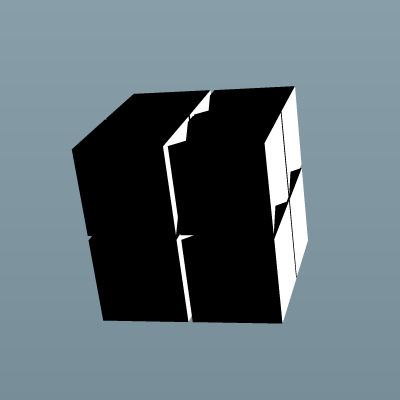
… then I defined camera clipping, but no success (someone’s suggestion, but it seems clipping is to be used for different purpose):
camera.useClipping = true; // before line 57… adding quarterFaces(), some more vertices for each vertex is not gonna save the day:
cube.quarterFaces(); // before line 50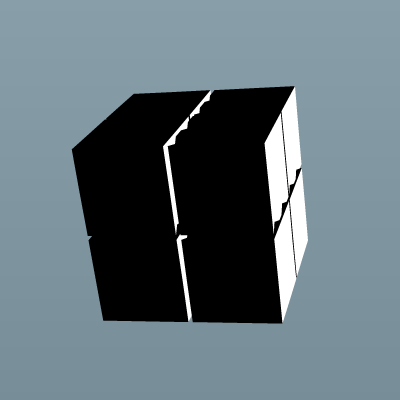
… adding ViewportLayer-s for each object fixed first problematic view, but corrupted another:
import org.papervision3d.view.layer.ViewportLayer;
...
var viewportLayer:ViewportLayer; // before line 42
...
viewportLayer = viewport.getChildLayer(cube, true); // before line 51
viewportLayer.addDisplayObject3D(cube);
… useOwnContainer should (and does) work the same as adding ViewportLayers:
cube.useOwnContainer = true; // before line 50… finally, layering + sortMode seems to work fine, and fast :-)
import org.papervision3d.view.layer.util.ViewportLayerSortMode;
...
viewport.containerSprite.sortMode = ViewportLayerSortMode.ORIGIN_SORT; // before line 28
...
cube.useOwnContainer = true; // before line 50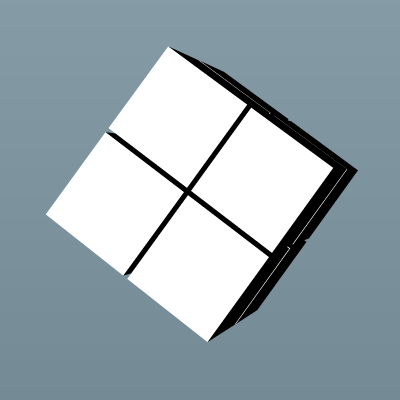
update Mar 5, 2010: … another successful attempt:
cube.meshSort = DisplayObject3D.MESH_SORT_FAR; // before line 50… ultimate method for correct z-sorting and rendering is in using slower QuadrantRenderEngine :-)
import org.papervision3d.render.QuadrantRenderEngine;
...
private var renderer:QuadrantRenderEngine //replace line 19
        = new QuadrantRenderEngine(QuadrantRenderEngine.CORRECT_Z_FILTER);
Where to go from where:
Fix Z-Sorting Issues Using Viewport Layers
Fix Z-Sorting issues with the QuadrantRenderEngine
Papervision3D now featuring frustum clipping
Using QuadTrees in Papervision3D
Forcing depths (forceDepth, screenDepth)
You may Leave a comment or Subscribe to Comments RSS or Trackback this entry.
6 comments so far
chris August 23, 2010 18:10 Awesome. Worked perfectly.
[pv3d] USING QUADTREES IN PAPERVISION3D (solve 3D obj collision problem) « CODE@蝴蝶。夢 October 13, 2010 11:52 [...] http://blog.yoz.sk/2010/03/fixing-z-sorting-in-papervision-3d/ [...]
vitaly November 22, 2010 13:27 Thanks a lot for the post. Really helped to solve the issue. I’m also trying to solve the same issue with Away3d :^)
Ivano April 4, 2011 13:37 Cheers mate. I guess it’s worth noting here that since setting useOwnContainer=true may give some troubles with DisplayObject3D instances registered to InteractiveScene3DEvent.OBJECT_CLICK events – basically those instances become sort of numb to previously registered OBJECT_CLICK events – changing OBJECT_CLICK to OBJECT_PRESS makes everything work like a charm.
Jozef Chúťka April 4, 2011 23:44 Hi Ivano thanks for the tip
walv July 31, 2011 23:05 Thanks for this good post!
Leave a comment
Please be polite and on topic. Your e-mail will never be published.