blog
Tag Archive for BasicRenderEngine at Jozef Chúťka's blog
March 4, 2010
BasicRenderEngine Cube DisplayObject3D Papervision 3D QuadrantRenderEngine sortMode ViewportLayer ViewportLayerSortMode z-sort
Fixing Z-sorting in Papervision 3D (update)
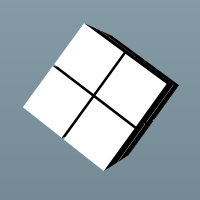
It may be very tricky thing to get papervision 3d scene rendered correctly event for the simpliest objects. In my case, I have created simple 3d scene with few primitive objects (8 cubes). Cubes are positioned close to each other to create shape of bigger cube + some small space between. Cubes are added into wrapping DisplayObject3D, later wrapper is added to scene in order to make it easy to rotate cubes as a group. Camera targets the center of the scene. In the demo, there are 3 sliders to rotate wrapping object in each x, y, z axis + two buttons that rotates wrapper in the problematic possition (based on z-sorting fix approach). Finally I managet it to work, you can follow my approaches below. Notice the changes are not cummulative, each approach comes from original Application.mxml. All of the ideas collected online from blogs, forums etc.
November 2, 2009
BasicRenderEngine Camera3D Cube MaterialsList Papervision 3D Scene3D Viewport3D WireframeMaterial
Simple working Flex papervision 3d example
Today I started to play with papervision3d after a long time again. If you are looking for a simple scene example try this one:
<?xml version="1.0" encoding="utf-8"?>
<mx:Application xmlns:mx="http://www.adobe.com/2006/mxml" layout="vertical"
    applicationComplete="init()">
<mx:Script>
<![CDATA[
    import org.papervision3d.materials.utils.MaterialsList;
    import org.papervision3d.objects.primitives.Cube;
    import org.papervision3d.materials.WireframeMaterial;
    import org.papervision3d.render.BasicRenderEngine;
    import org.papervision3d.cameras.Camera3D;
    import org.papervision3d.scenes.Scene3D;
    import org.papervision3d.view.Viewport3D;

    private var viewport:Viewport3D;
    private var scene:Scene3D;
    private var camera:Camera3D;
    private var renderer:BasicRenderEngine;
    private var cube:Cube;

    private function init():void
    {
         viewport = new Viewport3D(pv3dCanvas.width, pv3dCanvas.height, false, true);
         pv3dCanvas.rawChildren.addChild(viewport);
         viewport.buttonMode = true;

         renderer = new BasicRenderEngine();
         scene = new Scene3D();
         camera = new Camera3D();
         camera.zoom = 10;

         var material:WireframeMaterial = new WireframeMaterial(0x000000, 1, 1);
         material.oneSide = false;
         material.smooth = true;

         var materials:MaterialsList = new MaterialsList();
         materials.addMaterial(material, "front");
         materials.addMaterial(material, "back");
         materials.addMaterial(material, "right");
         materials.addMaterial(material, "left");
         materials.addMaterial(material, "top");
         materials.addMaterial(material, "bottom");

         cube = new Cube(materials, 600, 600, 600, 1, 1, 1, Cube.ALL, Cube.TOP);
         cube.x = 0;
         cube.y = 0;
         cube.z = 0;

         scene.addChild(cube);

         addEventListener(Event.ENTER_FRAME, loop);
    }

    private function loop(event:Event):void
    {
        cube.rotationX++;
        renderer.renderScene(scene, camera, viewport);
    }
]]>
</mx:Script>
<mx:Canvas id="pv3dCanvas" width="100%" height="100%" />
</mx:Application>
Do not forget to add Papervision3D.swc into your project.